Introduction
Most healthcare organizations already pay for Microsoft 365. So when budget season hits, someone always asks: can we just build our QMS in SharePoint instead of buying separate software?
The honest answer is yes, and no. SharePoint can technically host document control, CAPA tracking, and training records.
But the results depend entirely on how it's configured, how well it maps to your regulatory obligations, and how many facilities or departments you're trying to govern.
This article walks through exactly how to build a QMS in SharePoint, step by step.
We'll cover what's required, the parameters that determine whether it holds up under survey pressure, the mistakes that trip up most teams, and when it's time to add an intelligent layer on top.
Key Takeaways
- SharePoint supports document control, CAPA tracking, and training, but every workflow needs manual setup
- Plan your regulatory framework (CMS CoP, accreditation standards, HIPAA) before building a single library
- Power Automate excels at notifications but can't natively link documents, CAPAs, and audits
- Multi-facility organizations often hit a scaling ceiling that forces a decision on governance tools
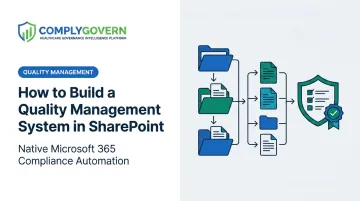
How to Build a Quality Management System in SharePoint
A working SharePoint QMS gets built in layers: document control first, then tracking systems, then automation on top. Healthcare organizations that skip the regulatory mapping step early almost always end up rebuilding later. Here's the sequence that works.
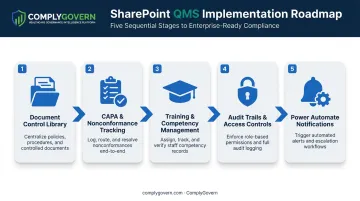
Step 1: Build Your Document Control Library
Start with a "Controlled Documents" library. Enable version history with major/minor numbering and turn on content approval so nothing goes live without sign-off.
Add these metadata columns:
- Document type (policy, SOP, form, work instruction)
- Revision number
- Effective date and review date
- Document owner
- Department
For healthcare organizations, this is the step that determines whether survey prep is smooth or painful. Map every policy and SOP to the specific requirement it satisfies.
Hospital Conditions of Participation live in 42 CFR Part 482, and surveyors will ask you to prove a policy exists for a specific tag. If that mapping isn't built into your metadata from day one, you'll be doing it manually under deadline pressure during your next survey.
Step 2: Set Up CAPA and Nonconformance Tracking
Create a CAPA register as a SharePoint list. Fields should include:
- Source (audit finding, complaint, incident report)
- Root cause
- Corrective and preventive actions
- Assigned owner and due date
- Effectiveness check date
Use Microsoft Forms for incident and nonconformance submission. Staff fill out the form, and a flow pushes the response directly into your CAPA list. Build filtered views like "My CAPAs," "Overdue CAPAs," and "By Department" so accountability doesn't get lost in a giant, unsorted list.
Step 3: Configure Training and Competency Management
Create a training records list and link it back to your document library, so completions tie to a specific policy version rather than a generic training title. Then build a training matrix defining which roles need which training, and how often.
This step is where administrative burden creeps in fastest. Compliance teams spend considerable time manually cross-referencing who's trained on what, at what version, and whether anything's expired, especially across departments with different renewal cycles.
Step 4: Establish Audit Trails, Security, and Access Controls
SharePoint's version history tracks document changes, but it isn't a complete audit log on its own. Configure role-based permissions at the site, library, and folder level, and be deliberate about it.
HIPAA's Security Rule requires technical policies limiting access to authorized users only, per 45 CFR 164.312, and that standard applies to anything PHI-adjacent, including quality records tied to patient incidents.
Use document sets to organize audit findings, evidence, and corrective actions by audit cycle. This keeps each survey period self-contained instead of scattered across folders.
Step 5: Automate Notifications with Power Automate
Build flows for:
- Document approval routing: sends drafts to the right reviewer automatically
- CAPA due-date reminders: alerts owners before deadlines slip
- Training expiration alerts: flags staff before certifications lapse
These flows work fine in isolation. What they won't do is cascade updates automatically. Update a policy, and your CAPA register, training matrix, and audit evidence don't know it happened unless you've built (and maintained) custom logic connecting them. That gap is where most SharePoint QMS builds start to strain.
Is SharePoint the Right Fit for Your Healthcare Organization's QMS?
SharePoint is a reasonable starting point for some organizations. For others, it becomes a liability the moment regulatory exposure grows.
Where SharePoint Can Work
- Small, single-site organizations with low document and CAPA volume and internal IT support to maintain configurations
- Facilities not yet facing frequent surveys, without regular CMS inspections, accreditation audits, or multi-site governance demands
- Organizations with dedicated administrators available to manage permissions, metadata, and workflow configurations manually
Where SharePoint Becomes a Risk
- Multi-facility organizations managing hospitals, ASCs, home health, or skilled nursing sites, where consistency and cross-linked governance data become essential rather than optional
- Facilities preparing for continuous survey readiness, where evidence must stay current at all times rather than assembled the week before an inspection
- Compliance teams tracking multiple accreditation bodies, where fragmented records increase audit risk and duplicate effort
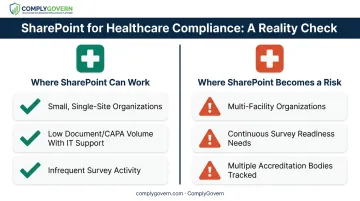
If your organization fits the second list, ask a different question: how much manual labor are you willing to absorb to keep SharePoint working?
Key Limitations That Affect Your Healthcare SharePoint QMS
Outcomes depend on how far SharePoint's native capabilities can be stretched to meet healthcare governance demands. Five limitations show up consistently.
Regulatory Mapping Complexity SharePoint has no built-in framework connecting policies to CMS Conditions of Participation, Joint Commission standards, or state survey requirements. Teams must build and maintain this mapping by hand, which raises the risk of gaps surfacing during a survey.
Electronic Signatures and Audit Trail Depth SharePoint lacks native e-signature workflows and tamper-evident audit trails detailed enough for defensible compliance evidence. Organizations typically bolt on third-party tools, adding cost and validation work.
Cross-Functional Data Linking Quality, compliance, and risk data often live in separate lists with no automatic relationship between a policy, its associated risk, and any related corrective action. This disconnect drives duplicate work: compliance, quality, and risk teams frequently re-enter or re-verify the same information across separate systems.
Validation and HIPAA-Aligned Security Burden Any system touching PHI-adjacent content must be secured to HIPAA expectations. In SharePoint, that responsibility sits entirely with the organization, not Microsoft. Revalidation is required every time workflows, permissions, or add-ons change.
Scalability Across Facility Types and Departments
| Facility Type | Regulatory Pathway | Quality Program Requirement |
|---|---|---|
| Hospital | 42 CFR Part 482 | QAPI (482.21) |
| ASC | 42 CFR Part 416 | QAPI (416.43) |
| Home Health | 42 CFR Part 484 | QAPI (484.65) |
| SNF/Nursing Facility | 42 CFR Part 483 | QAPI (483.75) |
Each facility type follows a different regulatory part with different survey guidance. Keeping dozens of SharePoint sites consistent across all of them, without a unifying structure, becomes unmanageable fast.
Common Mistakes and Troubleshooting Tips
Most SharePoint QMS problems trace back to a handful of avoidable decisions:
- Building document libraries before mapping regulations. Skipping this step forces teams to restructure metadata and re-tag every document later.
- Assuming Power Automate connects everything automatically. It doesn't. Teams must build and maintain every CAPA, training, and document connection manually.
- Underestimating ongoing administrative burden. Manually cross-referencing training matrices, CAPA statuses, and document versions before every audit consumes real staff hours each quarter.
- Ignoring early warning signs. Rising manual-tracking hours and audit findings citing missing traceability both signal the system has outgrown SharePoint alone.
When these signs appear, platforms like ComplyGovern extend SharePoint's native structure with automated evidence collection and CAPA-to-document traceability, closing gaps manual builds can't sustain.
Beyond SharePoint: When and How to Elevate Your Healthcare Governance System
Most healthcare organizations don't need to abandon SharePoint. The real goal is usually connecting it to something smarter, not starting from scratch.
Alternative 1: Fully Custom-Built SharePoint QMS with Consultants
When it's better: Organizations with strong internal IT and a narrow, stable set of quality requirements that isn't likely to expand.
Trade-offs: High consulting costs, long build timelines, and full ownership of ongoing validation and maintenance once the consultants leave.
Alternative 2: Generic Off-the-Shelf eQMS Software
When it's better: Organizations that need compliance features fast and don't have a heavy existing Microsoft 365 investment.
Trade-offs: Creates a new data silo, disconnected from the SharePoint content, policies, and Microsoft 365 workflows your team already uses daily.
Alternative 3: An Intelligent Governance Layer Native to Microsoft 365 and SharePoint
When it's better: Organizations that want to keep the SharePoint environment their staff already knows, while gaining automatic linking between regulations, policies, evidence, risks, and corrective actions.
This is the approach platforms like ComplyGovern take. Rather than replacing SharePoint, its Governance Intelligence Engine links every layer of governance together, including:
- Regulations and accreditation standards
- Policies and controls
- Evidence and quality measures
- Risks, audits, and findings
- Corrective actions
Update a policy, and linked controls, evidence gaps, and corrective actions surface automatically, no manual re-tagging required.
The platform maps to CMS Conditions of Participation, Joint Commission, DNV, AAAHC, ACHC, and other CMS-recognized accreditors. HIPAA-aligned security is built into the architecture from the start.
Trade-offs: Requires evaluating a platform investment and enterprise sales process, but it eliminates the duplicate manual effort described throughout this guide.
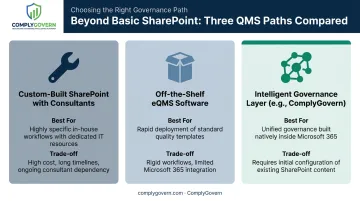
A SharePoint QMS can work well for simple, low-volume needs. Most failures come down to two things: missing regulatory mapping at the start, and governance data that lives in disconnected silos.
The right approach balances the familiarity your team already has with the compliance confidence and governance visibility your organization needs from boardroom to bedside.
Frequently Asked Questions
Can SharePoint be used as a QMS?
Yes. SharePoint can support document control, CAPA tracking, and training records with proper configuration. It requires significant manual setup and lacks native e-signatures and automated cross-linking between governance data.
What are the 7 steps of QMS?
QMS lifecycles generally follow document control, planning, risk management, corrective action, training, internal audit, and management review. These map to the ISO 9001 process approach, and each step can be built into SharePoint lists and libraries individually.
Does Microsoft have a QMS?
No. Microsoft doesn't sell a dedicated QMS product. SharePoint and Power Automate provide building blocks, such as document libraries, lists, and workflow triggers, which organizations configure into a basic quality system themselves.
How long does it take to build a QMS in SharePoint?
A basic setup can take days to a few weeks. A fully mapped, healthcare-compliant system with proper regulatory alignment across all your facility types typically takes several months of iterative configuration.
Is SharePoint HIPAA compliant for healthcare quality management?
SharePoint can be configured with HIPAA-aligned security controls, but responsibility for access controls, audit trails, and ongoing monitoring rests entirely with your organization, not Microsoft.
What's the difference between a SharePoint QMS and a platform like ComplyGovern?
A native SharePoint QMS requires manual linking between every document, CAPA, and training record. ComplyGovern works within Microsoft 365 and SharePoint but automatically connects regulations, policies, evidence, risks, and corrective actions for healthcare governance specifically.