Introduction
Walk into any healthcare compliance office in 2026 and you'll hear the same complaint: every vendor claims to be "HIPAA compliant," but almost none can prove it on request.
That gap matters more now than ever. Large breaches attributed to hacking have jumped 89% since 2019, and ransomware-related breaches have climbed 102% over the same period, according to HHS's own cybersecurity rulemaking materials.
Add expanding CMS facility types and AI-driven data flows into the mix, and a generic compliance badge tells you almost nothing.
Here's the catch: there is no official government HIPAA certification. Buyers have to verify compliance themselves, through documentation, evidence, and vendor transparency.
This article gives you the full 2026 checklist: what to request from vendors, the three safeguard categories to test, how to read vendor answers, and the mistakes that get organizations in trouble.
Key Takeaways
- HIPAA software must cover Administrative, Technical, and Physical safeguards — no single feature does it all
- Every PHI vendor must sign a BAA backed by SOC 2 Type II or HITRUST evidence
- Continuous, real-time monitoring is replacing reactive, audit-driven checks as the 2026 standard
- Vague "HIPAA compliant" claims and poor EHR integration are common evaluation mistakes
- Unified platforms reduce duplicate vendor management and support ongoing survey readiness
What You Need to Evaluate HIPAA Compliance Software
Before comparing feature lists side by side, get your documentation requests and internal readiness in order. Skipping this step is why so many evaluations end up comparing apples to oranges.
Documentation and Proof Points to Request from Every Vendor
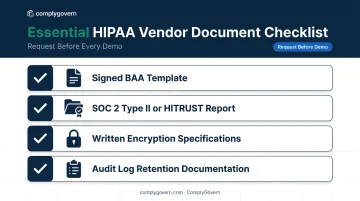
Ask every vendor for these items before a demo, not after:
- Signed BAA template spelling out PHI handling responsibilities and breach notification timelines
- SOC 2 Type II report or HITRUST certification providing independent, third-party security assurance
- Written encryption specifications for data at rest and in transit
- Audit log retention documentation and breach notification procedures
On that last point, timing precision matters. The individual notification clock runs without unreasonable delay and no later than 60 calendar days after discovery, per 45 CFR 164.404. Breaches affecting 500 or more people trigger simultaneous notice to HHS on that same 60-day clock, while smaller breaches get logged and reported annually.
Why push this hard in 2026 specifically? OCR's August 2025 settlement with BST & Co. marked its 15th ransomware enforcement action and 10th action under the Risk Analysis Initiative.
Recent settlements at Northeast Radiology ($350,000) and Health Fitness Corporation ($227,816) both cited missing or inadequate risk analysis as the root failure. A vendor that can't produce a current risk analysis and remediation plan on paper is repeating the exact failure pattern OCR keeps penalizing.
Internal Prerequisites Before You Start Evaluating
You can't evaluate a vendor's fit until you know your own environment:
- Complete a PHI data flow inventory, mapping where PHI is created, stored, and transmitted, department by department
- Assemble a cross-functional evaluation team spanning compliance, IT/security, legal, and executive leadership, not just one department
- Define your facility type and regulatory scope, since a hospital, an ASC, and a home health agency face different checklist weight distributions
Skip step three and you'll end up over-indexing on features that don't apply to your certification pathway.
The Core HIPAA Compliance Software Checklist: Three Categories to Evaluate
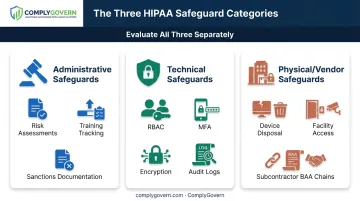
HIPAA compliance software should be tested against the same three safeguard categories defined in the Security Rule itself. A platform can be excellent in one category and dangerously weak in another, so evaluate all three separately.
Category 1: Administrative Safeguards and Governance Capabilities
This category measures how the platform manages risk assessments, policies, training, and sanctions tracking.
Key features to verify:
- Automated risk assessment workflows
- Policy version control
- Workforce training tracking
- Sanctions and corrective action documentation
Step-by-step evaluation:
- Request a live demo of the risk assessment and remediation workflow
- Confirm the platform retains documentation for the 6-year minimum required under 45 CFR 164.316
- Verify policy update and distribution logs are timestamped and auditable
Why it matters: A platform with strong administrative safeguards gives compliance officers a defensible audit trail without manually reconstructing it after the fact. This is where policy-to-evidence mapping earns its keep.
ComplyGovern's Governance Intelligence Engine, for example, links regulations and accreditation standards directly to policies, controls, and evidence. When a policy updates, the connected risk register and quality metrics update with it, instead of three departments maintaining three separate spreadsheets for the same requirement.
Category 2: Technical Safeguards
This category covers access control, encryption, and audit logging protecting ePHI.
Key features to verify:
- Role-based access control (RBAC)
- Multi-factor authentication (MFA) support
- Automatic logoff
- End-to-end encryption
- Tamper-evident audit logs
Step-by-step evaluation:
- Test whether the platform enforces least-necessary access by role
- Confirm encryption standards in writing for data at rest and in transit
- Review a sample audit log export — check for user ID, timestamp, and action captured
Why it matters: Weak technical safeguards show up repeatedly in OCR breach investigations. Don't accept "AES-256" or "TLS 1.3" as a verbal claim; HIPAA itself doesn't name specific cipher suites, but HHS points to NIST guidance as the benchmark. Ask for it written down, and ask for a recent independent penetration test summary as proof, not marketing copy.
Category 3: Physical Safeguards and Business Associate/Vendor Risk Management
This category covers device and media controls, plus how the vendor manages its own subcontractors and downstream data flows.
Key features to verify:
- Device and media disposal tracking
- Facility access controls for on-prem components
- Subcontractor BAA chain visibility
- Ongoing vendor risk monitoring dashboards
Step-by-step evaluation:
- Ask the vendor to map every subcontractor that touches PHI through their platform
- Confirm BAAs exist not just with the vendor, but with all downstream subcontractors
- Check whether the platform provides ongoing vendor risk monitoring rather than a one-time review
Why it matters: Fragmented vendor management (spreadsheets here, BAAs filed there, no central register) is one of the most common gaps compliance teams miss. A HIPAA Journal review found that 11 of the 23 largest healthcare breaches reported for 2025 involved business associates.
Platforms that keep an enterprise risk register and policy governance system in one place, rather than scattered across departmental tools, make it easier to house BAA documentation and flag vendor exposure before it becomes a breach.
How to Interpret Vendor Responses and Evaluation Results
Misreading a vendor's answers can land you with a partner who creates risk instead of reducing it. Here's how to sort responses:
| Response Category | What You'll See | Your Move |
|---|---|---|
| Compliant/Acceptable | Signed BAA, current SOC 2 Type II or HITRUST report, written encryption/audit specs provided readily | Proceed to contract; confirm renewal and update cadence |
| Minor Gaps | No specific certification, but compensating controls and a documented remediation timeline exist | Acceptable if your risk assessment confirms the gap is low-severity and time-bound |
| Red Flags | Vendor won't sign a BAA, can't produce written encryption specs, or claims a "HIPAA certification" that doesn't exist | Eliminate the vendor; document the decision for your own audit trail |
That last row deserves emphasis: no government-endorsed HIPAA certification exists.
According to the HHS FAQ on HIPAA certification programs, the department does not endorse, certify, or recommend specific products or vendors.
Any vendor claiming otherwise has already failed your evaluation, regardless of what else they offer.
Common Mistakes and Best Practices When Selecting HIPAA Compliance Software
Even careful teams fall into predictable traps. Watch for these:
Common mistakes:
- Treating a marketing badge as proof instead of requesting the underlying documentation
- Evaluating point solutions in isolation, without checking interoperability with existing EHR and governance systems (Epic, Oracle Health/Cerner, MEDITECH, athenahealth)
- Focusing only on pre-purchase audit prep instead of asking whether the platform supports continuous, real-time monitoring
Best practices:
- Request the underlying documentation behind certification badges and compliance claims before accepting them as proof
- Involve compliance, IT, legal, and executive/board stakeholders jointly: siloed decisions produce blind spots
- Prioritize platforms offering continuous survey and audit readiness with live dashboards over tools built only for periodic checklist completion
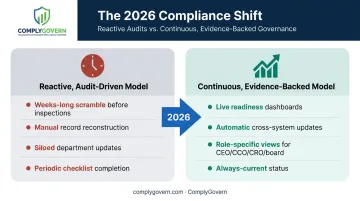
That second best practice is the real 2026 dividing line. Traditional compliance tools treat survey prep as a weeks-long scramble every time an inspection looms.
A unified platform like ComplyGovern instead runs a live Readiness Index: role-specific dashboards for the CEO, CCO, CRO, and board that reflect current compliance, quality, and risk status at all times, not just the week before a surveyor arrives.
When one update happens, such as a policy approved or a corrective action closed, it flows automatically through the connected system rather than requiring three teams to update three separate records.
Conclusion
Evaluating HIPAA compliance software in 2026 means checking documentation first, testing all three safeguard categories second, and reading vendor responses correctly before anyone signs anything.
The larger shift matters just as much: moving from reactive, audit-driven compliance to continuous, evidence-backed governance. Organizations that make that shift stop scrambling before every survey and start operating with real-time readiness instead.
Choosing the right platform, like ComplyGovern, reduces risk exposure and administrative burden across the entire organization, from the boardroom to the bedside.
Frequently Asked Questions
What is HIPAA compliant software?
It's software that implements the Security Rule's administrative, physical, and technical safeguards, backed by a signed BAA and documented audit trails.
Is there an official HIPAA certification for software?
No. HHS does not endorse or certify specific technologies. Vendors demonstrate compliance through documentation, third-party audits like SOC 2 or HITRUST, and willingness to sign a BAA.
What should a HIPAA compliance software checklist include?
BAA verification, written encryption and access control specs, audit logging capability, risk assessment tools, and vendor/subcontractor risk management. All three safeguard categories need separate testing.
How much does HIPAA compliance software typically cost?
Costs vary widely by organization size, facility type, and platform scope. Factor in reduced manual audit-prep hours as part of total cost of ownership, not just the subscription fee.
Does using HIPAA compliance software guarantee full compliance?
No. Software supports compliance but doesn't guarantee it. Your policies, training, and day-to-day organizational practices still have to align with the safeguards the software enables.
How often should HIPAA compliance software evaluations be repeated?
Revisit evaluations annually or after major regulatory, staffing, or technology changes. Continuous-monitoring platforms reduce how disruptive those periodic re-evaluations need to be.